Attention: Here be dragons
This is the latest
(unstable) version of this documentation, which may document features
not available in or compatible with released stable versions of Godot.
Checking the stable version of the documentation...
Utiliser l'éditeur de configuration de compilation du moteur
Godot comprend un large ensemble de fonctionnalités. Bien que ce soit pratique, cela implique que la taille de l'exécutable est agrandie, en particulier pour les projet n'en utilisant qu'une petite partie.
Pour réduire la taille de l'exécutable, vous pouvez compiler les modèles d'export personnalisés en désactivant certaines fonctionnalités. Vous trouverez plus de détails dans Optimiser une compilation pour sa taille. Cependant, choisir les bonnes fonctions à désactiver peut s'avérer être une tâche complexe. L'éditeur de profil de compilation propose une interface pour facilement voir et modifier ces fonctionnalités, tout en affichant celles qui sont actuellement utilisées dans le projet.
The allows you to create and manage build profiles for your Godot project.
From now on, you have two possibilities:
Regarder la liste et décocher manuellement les fonctionnalités dont vous n'avez pas besoin.
Use the button to automatically detect features currently used in the project and disable unused features. Note that this will override the existing list of features, so if you have manually unchecked some items, their state will be reset based on whether the project actually uses the feature.
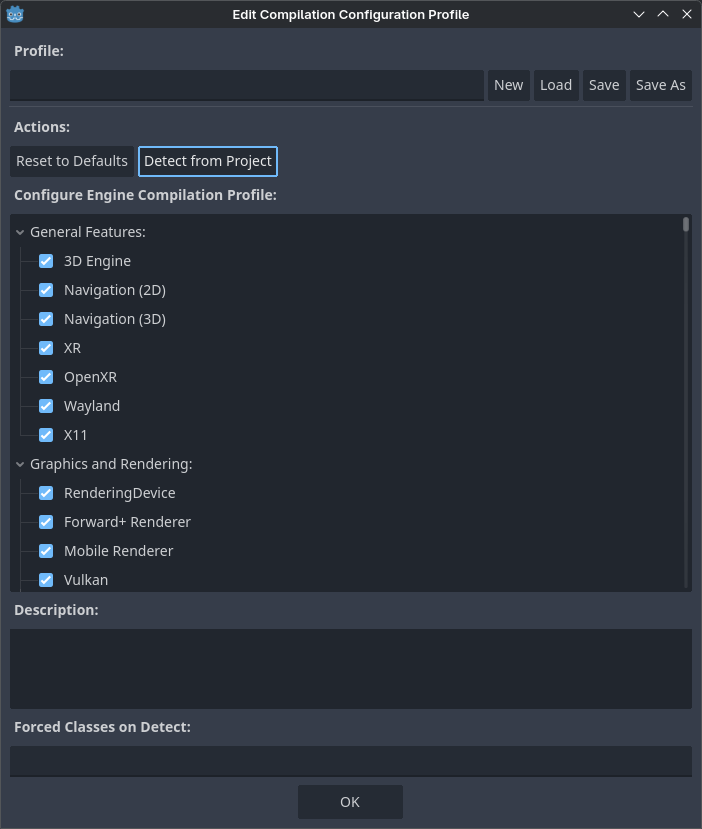
Opening the Engine Compilation Configuration Editor
Once you click , the project detection step will run. This can take from a few seconds up to several minutes depending on the project size. Once detection is complete, you'll see an updated list of features with some features disabled:
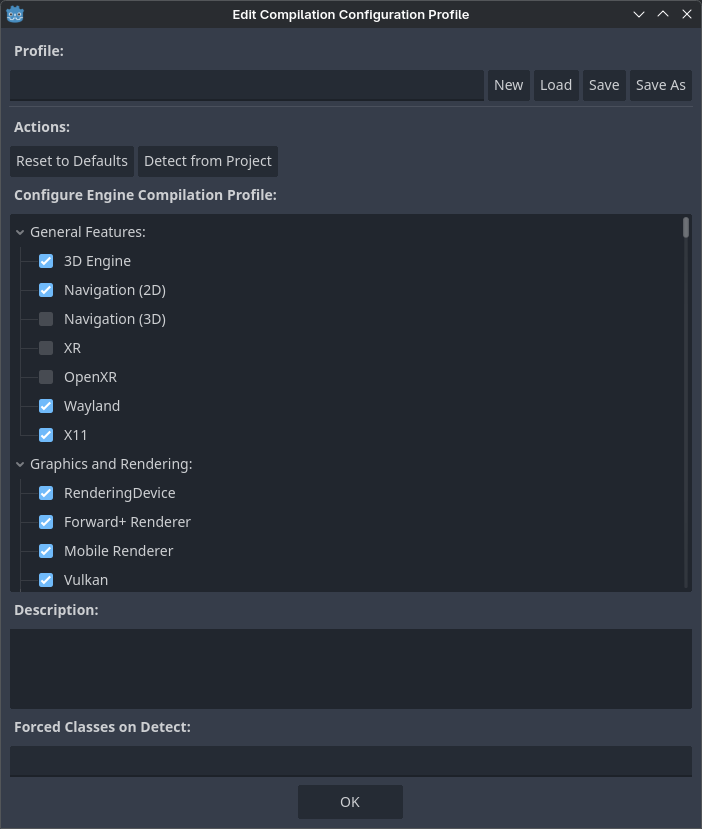
Updated features list after using feature detection (example from the 3D platformer demo)
Avertissement
Unchecking features in this dialog will not reduce binary size directly on export. Since it is only possible to actually remove features from the binary at compile-time, you still need to compile custom export templates with the build profile specified to actually benefit from the engine compilation configuration editor.
You can now save the build profile by clicking Save As at the top. The build profile can be saved in any location, but it's a good idea to save it somewhere in your project folder and add it to version control to be able to go back to it later when needed. This also allows using version control to track changes to the build profile.
The build profile is a JSON file (and .gdbuild extension) that looks like this
after detection in the above example:
{
    "disabled_build_options": {
        "disable_navigation_3d": true,
        "disable_xr": true,
        "module_godot_physics_3d_enabled": false,
        "module_msdfgen_enabled": false,
        "module_openxr_enabled": false
    },
    "disabled_classes": [
        "AESContext",
        ...
        "ZIPReader"
    ],
    "type": "build_profile"
}
This file can be passed as a SCons option when compiling export templates:
scons target=template_release build_profile=/path/to/profile.gdbuild
The buildsystem will use this to disable unused classes and reduce binary size as a result.
Limites
The functionality relies on reading the project's scenes and scripts. It will not be able to detect used features in the following scenarios:
Les fonctionnalités qui sont utilisées dans des GDScripts qui sont créées de façon procédurale puis exécutés durant l'exécution.
Les fonctionnalités qui sont utilisées dans des expressions.
Features that are used in GDExtensions, unless the language binding allows for defining used classes and the extension makes use of the functionality. See GH-104129 for details.
Features that are used in external PCKs loaded at runtime.
Certain edge cases may exist. If unsure, please open an issue on GitHub with a minimal reproduction project attached.
Voir aussi
Vous pouvez encore plus optimiser la taille en passant d'autres options qui réduisent la taille du binaire. Voir Optimiser une compilation pour sa taille pour plus d'informations.